Agents
The Agents sidebar shows coding agents running in your project, including their current state and any subagents. Select an entry to jump directly to its terminal.
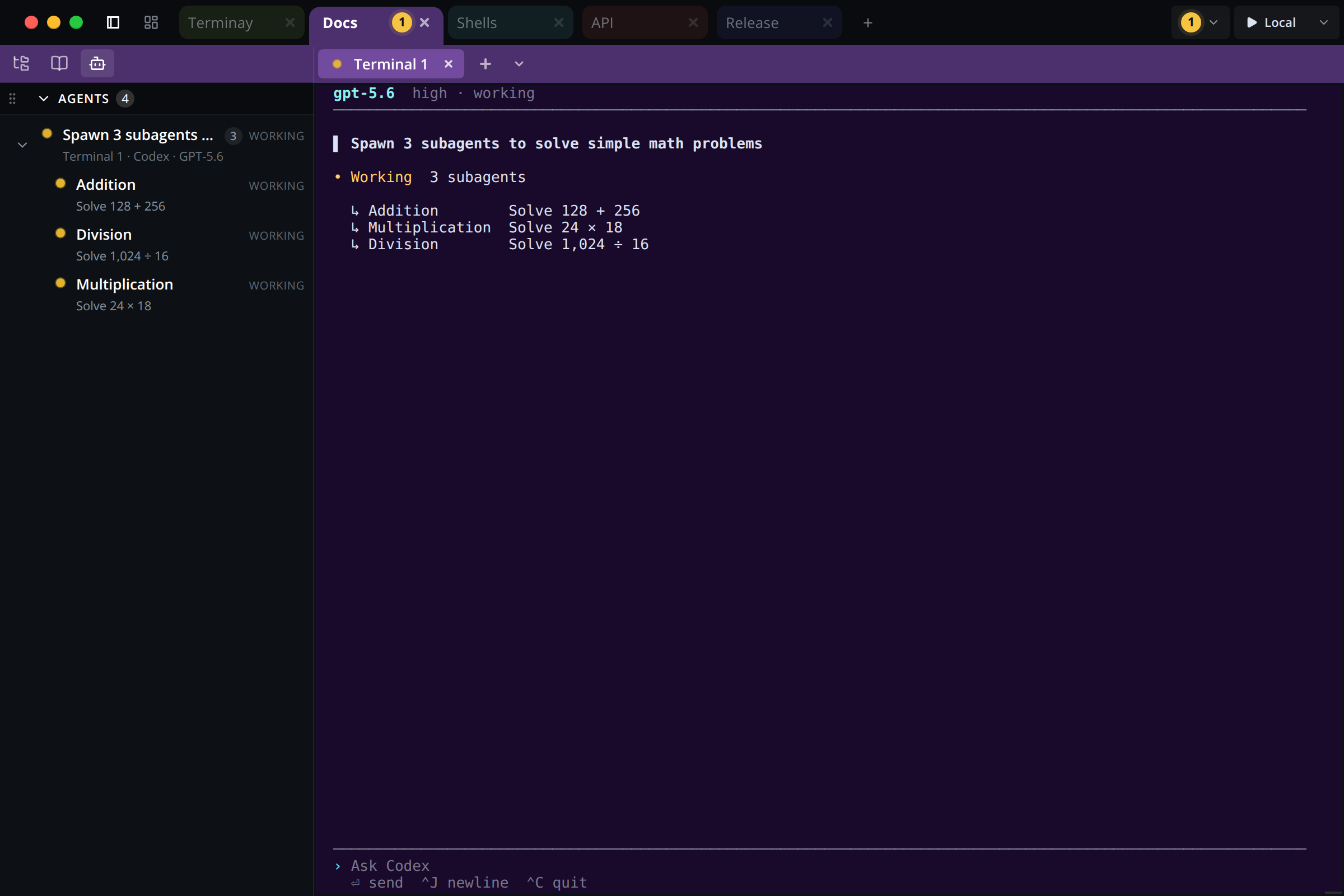
Open the Agents sidebar
- Start Codex, Claude Code, Cursor Agent, or omp in a Terminay terminal.
- Open Agents in the project sidebar.
- Select an agent or subagent to activate the terminal where it is running.
Terminay detects supported agents automatically from their local session activity. You do not need to install hooks or configure each terminal.
Read agent status
| Status | Meaning |
|---|---|
| Working | The agent is processing a turn, using a tool, or running subagent work. |
| Waiting | The agent needs approval, an answer, or another action from you. |
| Blocked | The agent reported a condition preventing it from continuing. |
| Done | The current turn completed, failed, or was cancelled. |
| Idle | The session is still available but has no active work to highlight. |
New activity can mark an entry as unread. Opening it clears the unread emphasis without changing the agent’s actual state.
What each agent CLI can report
What Terminay can show differs by provider. Every fact comes from artifacts the CLI already writes for its own purposes — Terminay never modifies, configures, hooks, or wraps an agent. Where a provider records nothing, Terminay says so rather than guessing.
Every cell below is verified against that provider's real CLI, on its latest release, running in an isolated container.
| Capability | Claude Code | Codex | Grok | OpenCode |
|---|---|---|---|---|
| Appears when launched | ✓ | ✓ | ✓ | ✓ |
| Shows the session title | ✓ | ✓ | ✓ | ✓ |
| Idle before any work | ✓ | ✓ | ✓ | ✓ |
| Working through a turn | ✓ | ✓ | ✓ | ✓ |
| Waiting for your input | ⚠ | ✗1 | ✓ | ✗4 |
| Blocked needing intervention | ✓ | ✗2 | ✗3 | ⚠ |
| Done, with its outcome | ✓ | ✓ | ✓ | ✓ |
| Names each subagent | ✓ | ✓ | ✓ | ✓ |
| Each subagent's own state | ✓ | ✓ | ✓ | ✓ |
| Returns after a resume | ✓ | ✓ | ✓ | ✓ |
| Several sessions at once | ✓ | ✓ | ✓ | ✓ |
| Value | Meaning |
|---|---|
| ✓ | The provider records the fact explicitly and Terminay reads it. |
| ⚠ | The provider records no explicit fact, so Terminay derives the state from that provider's own session journal by a named rule. The entry is marked as inferred, and an explicit record always supersedes it. |
| ✗ | Neither is possible from the provider's own artifacts. The reason is given below. |
A cross is a tested result, not an untested one. The conformance run still raises a real permission prompt or provokes a real fault, then asserts the state was never reported. A provider that begins recording a capability marked with a cross fails its own test until this table is corrected.
- Codex shows an approval prompt on screen but persists nothing that distinguishes it from ordinary work, so a Codex session awaiting approval reads as working.
- Codex records a halting fault as the completion of the turn it halted, so it reads as done with an error outcome rather than as blocked.
- Grok records no fault distinct from a turn outcome: a failed turn is a completion carrying an error, not a condition needing intervention.
- OpenCode persists no record of a permission request. Every tool part is written pending whether or not a prompt is shown.
omp is a supported provider whose verification is still in progress, so it makes no claim in this table yet.
Roots and subagents
A root entry represents one agent session in one terminal. If that agent starts supported child work, its subagents appear beneath the root. Selecting a subagent normally opens the same terminal because the child runs inside that root session.
Privacy and scope
Agent activity is scoped to the current project and terminal. Terminay reduces supported local journals into status, titles, models, and lifecycle events. Raw reasoning, responses, tool arguments, tool output, and journal records are not sent to connected clients.
If an agent does not appear
- Confirm the agent is running inside a Terminay terminal for the current project.
- Check that its built-in extension is enabled in Settings → Extensions.
- Keep the agent in the foreground briefly while it creates or resumes its session.
- Remote environments must provide the process and journal-observation capabilities required by that agent.
The Agents sidebar is independent from Terminay MCP. MCP lets an agent control sibling terminals; the sidebar reports agent activity. You can use either feature on its own.